Tijori Documentation
How to keep a clear, private record of your household's gold and silver.
Getting started
Install Tijori from Google Play.
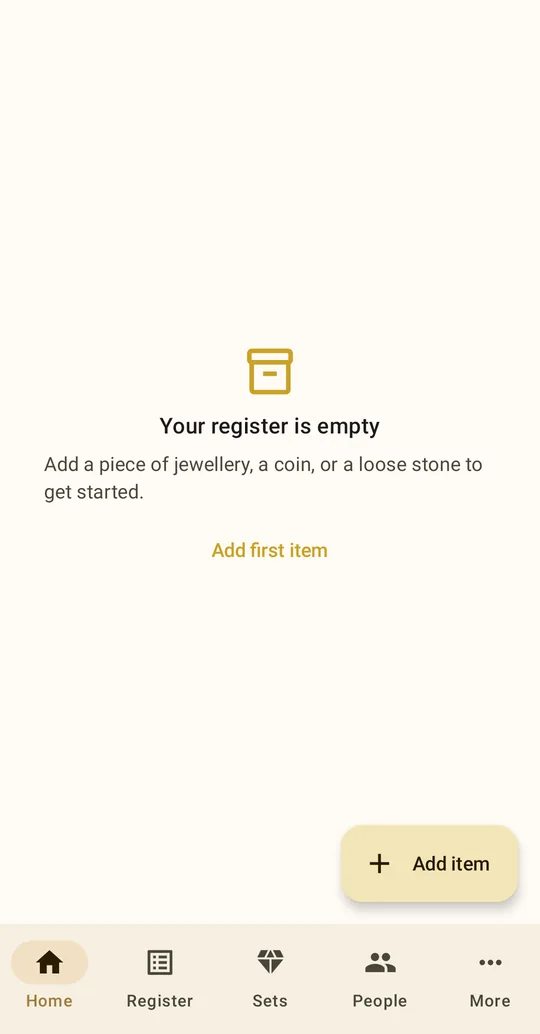
Tijori has five tabs: Home, Register, Sets, People and More. There is no sign-up. Open the app and start adding.
- Turn on the app lock. Go to More → Security → Biometric app lock. Tijori then asks for your fingerprint, face or device PIN every time it opens. The switch is only available if your phone has a fingerprint, face unlock or screen PIN set up.
- Add your family. In People, add each person who owns gold, so every piece has an owner. In India, their gender and marital status also decide which safe-harbor amount applies to them.
- Add your first piece. Tap Add item on Home. Start with the piece whose bill you can find most easily.
Tip: You don't need to do the whole locker in one go. Save the basics for every piece first, then come back and add bills and hallmarks.
Adding a piece
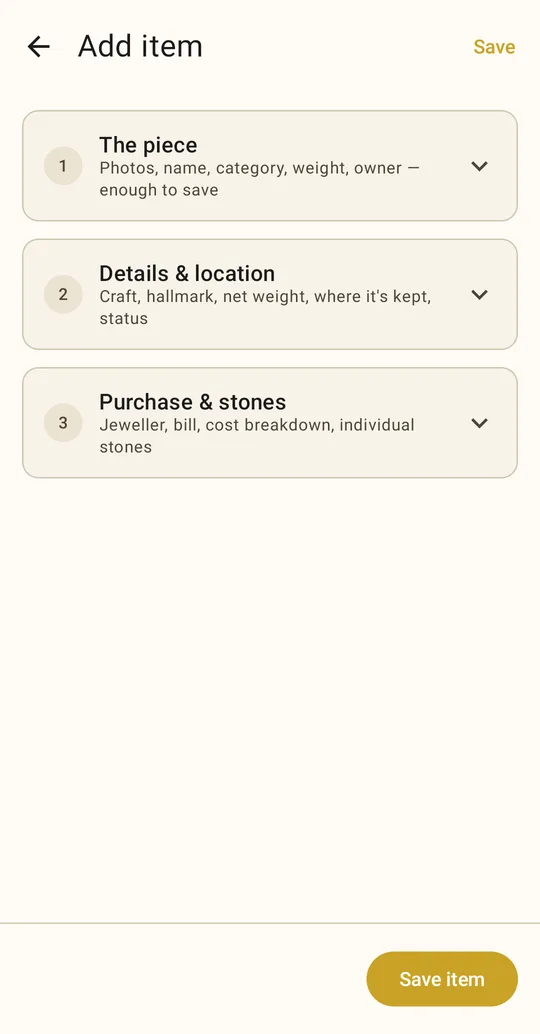
The add screen has three sections. Opening one closes the others, so you can see everything there is to fill in without a long form. Save at the top works from any section.
1 · The piece
This section is enough to save. It covers photos, name, category (jewellery, loose stone, bullion or other), material (gold, silver, platinum, panchaloha), gross weight, owner and type of proof.
2 · Details & location
Craft style (such as temple, kundan, polki, filigree, plain), condition, hallmark details (in India, the BIS hallmark and HUID), net and stone weight, which set it belongs to, status, and where it's kept.
3 · Purchase & stones
Jeweller, their tax number (GSTIN in India), invoice number, date, how you paid, and the cost breakdown. You can also list each stone in the piece. More below.
Weights: enter weights in grams, exactly as printed on the bill. Tijori doesn't work out net weight from gross weight minus stones, because bills often round or measure differently. If your bill uses tola or sovereign, convert with the weight converter.
Status & location
Each piece has a status (what's happening to it) and a location (where it is). They are separate fields: a pledged necklace can be at a bank branch, and a borrowed bangle can be at home.
| Status | Use it when |
|---|---|
| Held | The family has the piece. |
| Pledged | It's security for a gold loan. Tijori asks for the lender type (bank, NBFC, pawnbroker, jeweller, individual), their name, loan amount, interest rate, pledge date, due date and auction-risk date. |
| Loaned out | You've lent it to someone. Record who has it, when you lent it, and when it's due back. |
| Borrowed | It belongs to someone else and is with you for now. |
| In repair | It's with a jeweller for repair or resizing. |
Locations are Home, Bank locker, With relative, With jeweller, Pawnshop, Bank, NBFC branch, and Other. Use Location detail for specifics such as "Canara Bank, Jayanagar — locker 214".
Purchase & stones
Copy the bill's lines into these fields: rate of the day (per gram), metal value, making charges (with how they were charged: per gram, percent or fixed), stone value, tax (GST in India) and total paid. The bill checker can confirm the numbers add up.
Currency: amounts are shown in the currency set in More → Currency. It starts as your phone's own currency. Enter amounts exactly as the bill prints them. Changing the currency only changes the symbol; Tijori never converts between currencies.
If the piece was bought by exchanging old gold, set Acquired to Exchanged old for new. Tijori then asks for the old gold's weight and the amount credited.
Stones can be added one row at a time: type, natural / synthetic / imitation, quantity, carats or size in mm, shape, colour and clarity, and certificate number. The natural / synthetic / imitation field is the most important. Much everyday jewellery uses cubic zirconia, which has no resale value.
Sets
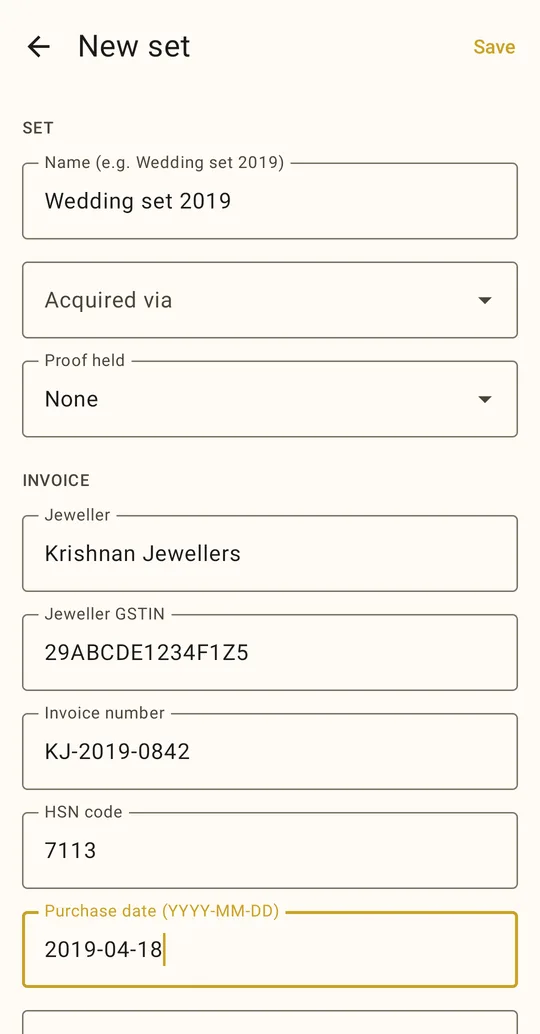
A set is a group of pieces bought on one bill, such as a bridal set. Enter the jeweller, invoice, payment and cost breakdown on the set, then add the pieces to it. The set's purchase details apply to every piece in it, so you can leave them empty on the pieces.
Each piece in a set still has its own weights, hallmark, photos, owner, status and location. A set can be split across family members and lockers.
People
Every piece has an owner. Each person in People has a name, relationship (self, spouse, child, parent, sibling, other), gender and marital status. In India, gender and marital status decide which safe-harbor amount applies to them.
Safe-harbor meter (India)
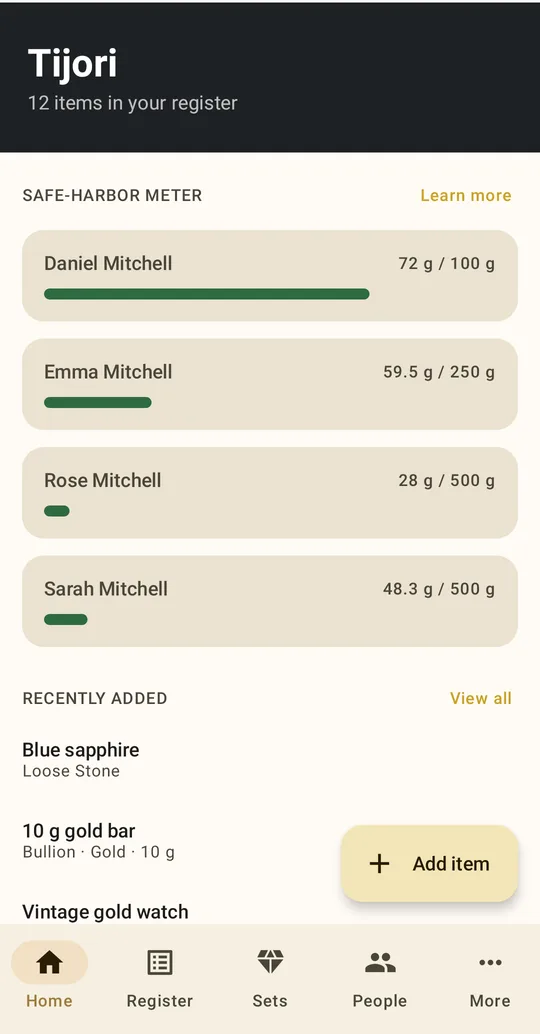
This one is for families in India. It's switched on when Tijori shows amounts in rupees and off otherwise; change it in More → Safe-harbor meter (India). Home shows one meter for each person. It adds up the gross weight of their gold and compares it with the amount in India's CBDT Instruction No. 1916: 500 g for a married woman, 250 g for an unmarried woman and 100 g for a man.
A warning appears only when a person is over their amount and has gold with no proof recorded. The figure shown is the weight above the line that has no proof. Those are the pieces to find paperwork for first: a bill for a purchase, a gift deed for a gift, a will for an inheritance.
This is not a legal limit. India doesn't cap how much gold you may own. These amounts only tell officers what not to seize during a search. Read the full explainer.
Privacy & app lock
- On your phone only. The register is stored in a database inside the app. There is no Tijori account or server, so we can't see your data.
- Not in Android backups. Tijori is excluded from Android's automatic cloud backup and device-to-device transfer. Your list of gold doesn't end up in a Google account.
- App lock. With the lock on, the register stays hidden until you unlock with your fingerprint, face or device PIN.
Photos
Every photo you add is saved in Tijori's private storage. Photos taken with the camera inside Tijori never go into your gallery, so Google Photos or other gallery backups won't upload them. If you add a photo from your gallery, Tijori saves its own copy. The original stays in your gallery, and in any gallery backup, until you delete it.
More → Data → Clear stored photos deletes every photo Tijori has saved. Your register entries stay.
Tip: For bills and hallmark close-ups, use the camera button inside Tijori rather than your phone's camera app. That keeps the photos out of your gallery and out of cloud photo backup.
Backup & restore
Your register lives only on your phone, so keep a backup somewhere else. There are two ways: save a backup file yourself, or let Tijori back up to your own Google Drive every day. If the phone is lost, you can restore everything onto a new one.
Save a backup
- Go to More → Backup & restore and tap Save backup file.
- Choose where the file goes: Google Drive, Downloads, a computer, or a pen drive. Anywhere other than only this phone.
The file is a normal .zip named like Tijori backup 2026-09-28 2330.zip. It holds every piece, person, set and photo, plus your name, theme and currency. Home reminds you if you haven't saved a backup in 30 days.
Automatic backup to Google Drive
- In More → Backup & restore, tap Turn on Google Drive backup.
- Pick your Google account and allow access. Tijori only gets its own hidden folder in your Drive and can't see anything else there.
Tijori saves a first backup straight away. After that it backs up once a day, but only when something has changed, and only on Wi-Fi unless you turn on Back up over mobile data. It keeps the newest five backups. Back up now saves one immediately. If Google access stops, for example because you removed it from your Google account, the screen asks you to connect again.
The hidden folder doesn't appear in the Drive app. To delete the backups, open Google Drive → Settings → Manage apps → Tijori → Delete hidden app data. Turn off stops automatic backups but leaves existing backups in Drive.
Backup files aren't encrypted. Anyone who has the file can read your register. Store it somewhere you trust, the same way you'd store photocopies of your bills.
Restore
- Install Tijori on the new phone. On the empty Home screen, tap Restore from a backup. On a phone that already has a register, go to More → Backup & restore.
- Tap Restore from backup file and pick the file, or tap Restore from Google Drive, connect your Google account and pick a backup from the list. Restoring from Drive doesn't turn on automatic backup.
- Tijori checks the file and shows what's in it: the date, and how many pieces, people, sets and photos. Tap Restore to confirm.
- Tijori restarts and swaps in the backup.
Restoring replaces the register on the phone. It doesn't merge. If the file is damaged, isn't a Tijori backup, or was made by a newer version of the app, Tijori says so and changes nothing. The app lock isn't part of the backup, so turn it on again on the new phone.
Backup and restore are available on Android. On iPhone, they'll come with the iPhone app, using iCloud instead of Google Drive.
FAQ
Does Tijori tell me what my gold is worth?
No. Tijori records what the bill says: the rate that day, what you paid and the making charges. It doesn't track live gold prices. Its job is to help you prove what you have, not to price it.
What happens if I lose my phone?
If you've saved a backup file somewhere other than the phone, or turned on Google Drive backup, install Tijori on the new phone and tap Restore from a backup. Everything comes back, photos included. Your purchase is restored by the app store. Without a backup, the register can't be recovered, because no copy exists anywhere else. How to back up.
Can my family share one register?
Not yet. The register lives on one phone. You can record gold for the whole family on that phone using People.
Is the Indian safe-harbor meter tax advice?
No. It shows figures from a published Indian tax instruction (CBDT) and names the source. Ask a tax adviser about your own situation.
Do coins and bars count towards the meter?
The meter adds up all gold owned by a person. The CBDT instruction itself talks about jewellery and ornaments, so keep proof of purchase for coins and bars whatever their weight.
What happens if I forget my PIN?
Tijori uses your phone's own fingerprint, face or screen lock and has no password of its own. If you can unlock your phone, you can unlock Tijori.